2018年9月26日 星期三

HPE switch 產品基本介紹(2018/9)


最近有在製作教育訓練文件,分享一下


HPE switch 產品基本介紹


Table of Contents


HPE的switch們

HPE-Aruba目前旗下有兩條主要的switch產品線
1.HPE-switch,前身是H3C/3com
2.Aruba-switch 前身是procurve switch
這邊以介紹HPE switch為主
可以訪問Hewlett Packard Enterprise Switch Selector看到所有HPE-Aruba switch的相關產品

Switch依照種類,可以劃分為固定port數的switch(1U switch)與可擴充模組的switch(機箱型switch)
目前7500系列以上都屬於機箱型switch


依照Routing/Switching的能力,又可以將switch分為三大類
1.Layer 3 Advanced
2.Layer 3 Lite
3.Layer 2 only


目前常見的HPE switch型號
L2 only -> 1420/1620/1820
L3 Lite -> 1920S/1950/5130
L3 Advanced ->5510/5940
Chassis ->7500/10500/12900


硬體介紹

每款switch都不相同,可以參考switch的installation guide
首先介紹耳朵與滑軌


電源,依照switch種類的不同,有電源模組/內建電源
風扇,依照switch種類的不同,有風扇模組/內建風扇/無風扇
PS:5940系列支援兩種不同的氣流流向,必須搭配特定的風扇模組


前方介紹


後方介紹


如何使用原廠文件


1.Datasheet ->查詢設備的硬體規格/支援功能

可以透過底下幾個項目尋找自己需要的資訊


PRODUCT OVERVIEW 介紹產品
FEATURES AND BENEFITS 介紹功能與優勢
KEY FEATURES 介紹關鍵功能
SPECIFICATIONS 比較同系列不同規格的差異
SERIES ACCESSORIES跟此系列設備相關的配件


2.Guide -> 各種功能的設定方式與說明


可以透過About  Guides更迅速的查找需要的資訊


3.Release note -> 各版本更新所增強的功能/修復的BUG/發現的問題


下載文件的位置
目前推薦使用HPE Library用搜尋產品的方式下載


常用資源


HPE Aruba 官方資源
HPE Aruba 官網
https://www.hpe.com/us/en/networking.html 英文網頁 全系列商品 包含DCN產品
http://www.arubanetworks.com/zh-hant/  中文網頁 不含 DCN 產品
HPE Aruba 服務網站- Firmware/Menu
Arubapedia for Partner  請註冊 Partner Portal 個人帳戶,並先取得 HPE Learner ID
HPE ExpertOne  認證資訊  HPE 考試認證相關資料 請先取得 HPE Learner ID 
Bulletin- Quick spec install require  HPE 全產品型錄


HPE Aruba 官方常用資源
On line configurator- IE only
HPE Aruba IRIS configurator 非常重要的 工具 請務必安裝起來….
Alex Cloud 招標規範 簡報資料
HPENTW-TC Google 分享空間 POC 相關概念
HPE Press  書籍購買網站
HPE Aruba 雙月刊 聯網快報


HPE Aruba 常用資源
E Aruba 保固說明 支援多國語言版本  終身保固,一年保固… 交換貨條件
HPE Aruba 保固查詢需輸入序號與購買國家就可以查詢
HPE Aruba Reference design    考試必讀經典
HPE Aruba Youtube  ABC Networking Aruba 解決方案影片說明.可以透過 Youtube 加上字幕方便觀看
HPE Aruba AOS8 LAB  Search Gary Huang 蓋瑞大師頻道
HPE The  IMC Management IMC 管理展示影片….


非官方資源


Vincent 的Blog


H3C文檔中心

2018年9月5日 星期三

Aruba switch config檔管理

Aruba switch config檔管理

1.檢視
#show running-config  檢視running-config
#show config status 檢視running-config與startup-config是否一樣
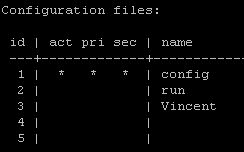
#show config files 檢視switch內有哪些config
#show config “config-name” 檢視某個config

2.上傳下載刪除

#copy running-config tftp 192.168.170.65 YYY
複製running-config到tftp server(ip 192.168.170.65),並取名為YYY
#copy config WWW tftp 192.168.170.65 YYY
複製名為WWW的config到tftp server(ip 192.168.170.65),並取名為YYY

#copy tftp config YYY 192.168.170.65 JJJ
複製tftp server上名為YYY的config到switch上,並改名為JJJ

#delete JJJ
刪除名為JJJ的config


3.指定開機使用的config
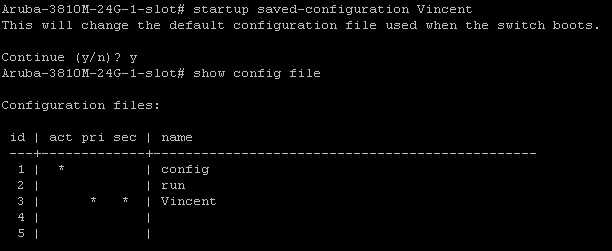
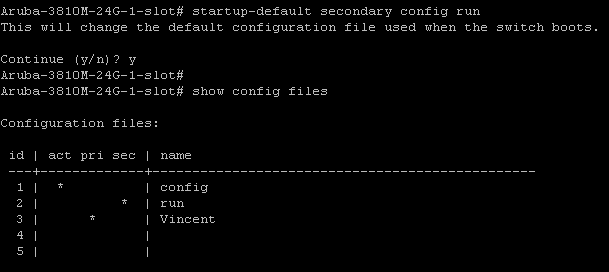
透過show config files 可以檢視config的使用情況
act->active、正在使用的config
pri->primary 開機優先使用的config
sec-secondary 開機第二順位使用的config

可以透過startup saved-configuration的指令指定switch開機時所要使用的config
如果要調整pri config與sec config,可以透過
startup-default primary/secondary config來調整


2018年8月28日 星期二

IRF HPE switch的軔體升級

IRF HPE switch的軔體升級

使用機型5940*2 (JH390A)
使用韌體R2609

1.先使用TFTP上傳韌體
<HPE5940-Core>tftp 1.1.1.2 get 5940-CMW710-R2609.ipe
Press CTRL+C to abort.
 % Total    % Received % Xferd  Average Speed Time    Time Time Current
                                Dload Upload Total Spent Left  Speed
100  122M 100  122M 0   0 192k 0  0:10:49 0:10:49 --:--:--  194k
Writing file...Done.


2.使用指令確認上傳成功
<HPE5940-Core>dir
Directory of flash:
  0 -rw-   128031744 Jan 01 2011 09:51:15   5940-CMW710-R2609.ipe
  1 -rw-    17256448 Sep 14 2017 00:00:00   5940-cmw710-boot-r2510p02.bin
  2 -rw-    87812096 Sep 14 2017 00:00:00   5940-cmw710-system-r2510p02.bin
  3 drw-           - Jan 01 2011 08:04:57   diagfile
  4 -rw-         735 Jan 01 2011 08:32:10   hostkey
  5 -rw-        4986 Jan 01 2011 09:23:57   ifindex.dat
  6 drw-           - Jan 01 2011 08:35:40   license
  7 drw-           - Jan 01 2011 08:03:46   logfile
  8 drw-           - Jan 01 2011 08:32:19   pki
  9 drw-           - Jan 01 2011 08:04:57   seclog
 10 -rw-         591 Jan 01 2011 08:32:10   serverkey
 11 -rw-       25253 Jan 01 2011 09:23:58   startup.cfg
 12 -rw-      349045 Jan 01 2011 09:23:58   startup.mdb
 13 drw-           - Jan 01 2011 08:05:22   versionInfo

1048576 KB total (815404 KB free)


3.使用boot-loader指令將檔案載入switch(因為IRF內的member都需要載入,所以slot的部份要選all)
<HPE5940-Core>boot-loader file flash:/5940-CMW710-R2609.ipe all main
Verifying the file flash:/5940-CMW710-R2609.ipe on slot 1...........Done.
HPE FF 5940 48SFP+ 6QSFP28 Switch images in IPE:
 5940-cmw710-boot-r2609.bin
 5940-cmw710-system-r2609.bin
This command will set the main startup software images. Continue? [Y/N]:y
Add images to slot 1.
Decompressing file 5940-cmw710-boot-r2609.bin to flash:/5940-cmw710-boot-r2609.bin.........................Done.
Decompressing file 5940-cmw710-system-r2609.bin to flash:/5940-cmw710-system-r2609.bin............................................................................................................................................Done.
Verifying the file flash:/5940-cmw710-boot-r2609.bin on slot 1...%Jan  1 09:57:29:796 2011 HPE5940-Core IFNET/3/PHY_UPDOWN: Physical state on the interface M-GigabitEthernet0/0/0 changed to down.
%Jan  1 09:57:29:798 2011 HPE5940-Core IFNET/5/LINK_UPDOWN: Line protocol state on the interface M-GigabitEthernet0/0/0 changed to down.
Done.
Verifying the file flash:/5940-cmw710-system-r2609.bin on slot 1..........Done.
The images that have passed all examinations will be used as the main startup software images at the next reboot on slot 1.
Loading.....................%Jan  1 09:58:01:079 2011 HPE5940-Core DEV/4/BOARD_LOADING: Board in slot 2 is loading software images.
..........%Jan  1 09:58:11:463 2011 HPE5940-Core DEV/5/LOAD_FINISHED: Board in slot 2 has finished loading software images.
.........................Done.
Loading.....................%Jan  1 09:58:56:236 2011 HPE5940-Core DEV/4/BOARD_LOADING: Board in slot 2 is loading software images.
..............................................%Jan  1 09:59:42:701 2011 HPE5940-Core DEV/5/LOAD_FINISHED: Board in slot 2 has finished loading software images.
........................................................................................................................................Done.
Verifying the file flash:/5940-cmw710-boot-r2609.bin on slot 2.....Done.
Verifying the file flash:/5940-cmw710-system-r2609.bin on slot 2...................Done.
The images that have passed all examinations will be used as the main startup software images at the next reboot on slot 2.
Decompression completed.


4.依照情況選擇是否要刪除韌體檔案

Do you want to delete flash:/5940-CMW710-R2609.ipe now? [Y/N]:n

5.之後尋找合適的時間存檔並重開機即可


如何用USB下載Aruba Controller內的檔案

如何用USB下載Aruba Controller內的檔案

某些型號的Aruba Controller上有USB介面,可以透過USB介面下載或是上傳檔案進Controller

1.先插入USB

2.檢視是否有讀取到USB
show storage,發現有看到USB

3.使用copy指令將檔案copy到usb


Aruba switch 背板堆疊

Aruba switch 背板堆疊(backplane stacking)

HPE/Aruba的switch依照不同的系列,支援多種虛擬化的方式
HPE switch(comware)系列用的IRF
Aruba switch依照類型支援VSF/backplane stacking(背板堆疊)
ArubaOS-CX支援VSX
其中目前只有3810M/2930M支援backplane stacking,並且要使用額外的堆疊模組與堆疊專用線(其餘虛擬化技術無需使用特製設備)

--------------------

1.先硬體安裝完switch(背板/電源等),並升級分位完成


2.接入堆疊線

某一台switch會自己重開機
這時候可以show stacking member2,看到standby正在開機


3.結束之後可以show stacking看到堆疊完成

2018年8月8日 星期三

Aruba controller - radius authentication debug

Aruba controller - radius authentication debug


如果用Aruba controller做radius認證的時候遇到問題,可以在Controller上啟用debug,
接著透過觀察response code的方式查找問題


先啟用debug
(config) # logging level debugging security process authmgr
(config) # logging level debugging security subcat aaa


接著使用裝置認證之後,檢視
show log security 50 找看看如下的訊息
Nov 20 20:14:16 :124003:  <INFO> |authmgr| Authentication result=Authentication Successful(0), method=802.1x, server=Aercorone, user=24:77:03:08:53:d0
Nov 20 20:14:16 :124004:  <DBUG> |authmgr| Auth server 'Aercorone' response=0


可以看到response=0
透過response可以明白認證過程中發生的問題


請參考以下response code的意義


0 - Auth_OK
1 - Auth_Fail: user/password combination is not correct.
2 - Auth_Timeout: auth request timed out; no response from server.
3 - Internal Error: internal error in auth; should engage engineering.
4 - Bad Response from server: check shared secret.
5 - No Auth Server configured.
6 - Challenge from server: does not necessarily indicate an error condition.


response code來源

2018年8月3日 星期五

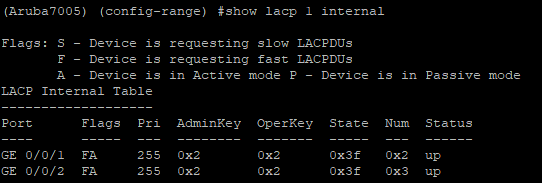
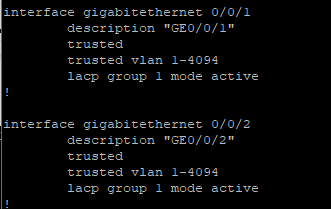
config LACP/port-channel of Aruba controller with HPE/Aruba switch

Config LACP of Aruba controller with HPE/Aruba switch


A.使用CLI設定Aruba controller的LACP

1.首先先進入要設定lacp的interface,這邊假設使用0/0/1與0/0/2 port做設定

2.設定LACP的group與mode,基本上都是active mode

然後接上設定好LACP的switch
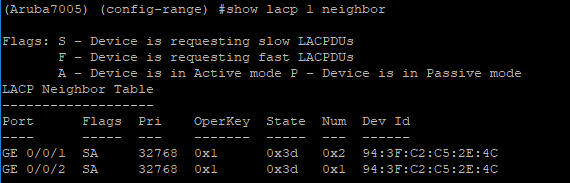
檢視neighbor的LACP狀態


檢視自己的LACP狀態


Config

要設定的話記得進入port-channel裡面設定

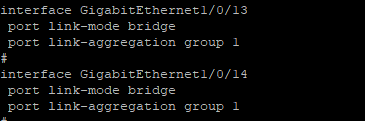
B.HP switch設定LACP

1.創造group 1,並將模式改為動態

2.進入要做LACP的port(13,14),並綁入LACP

3.接上設定好的Aruba controller,並檢視設定

config


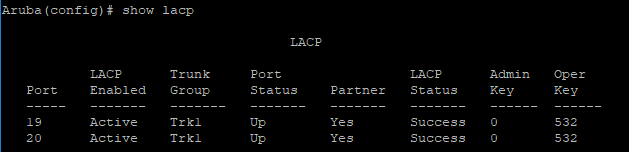
C.Aruba switch設定LACP

1.指定19,20 port,設定lacp,並分配給trk1

2.接上Aruba controller並檢視狀態

config


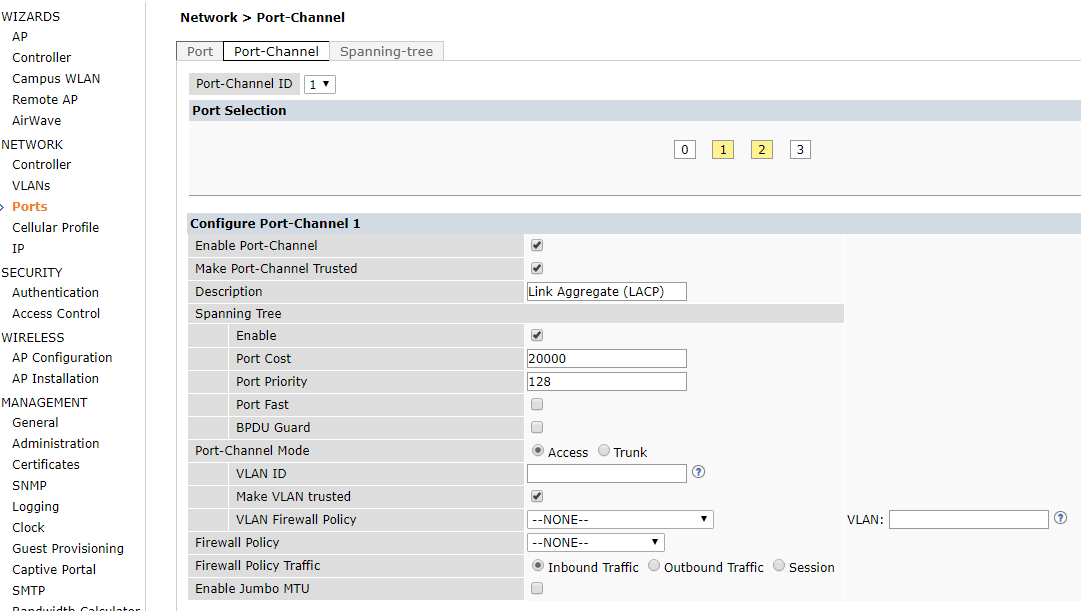
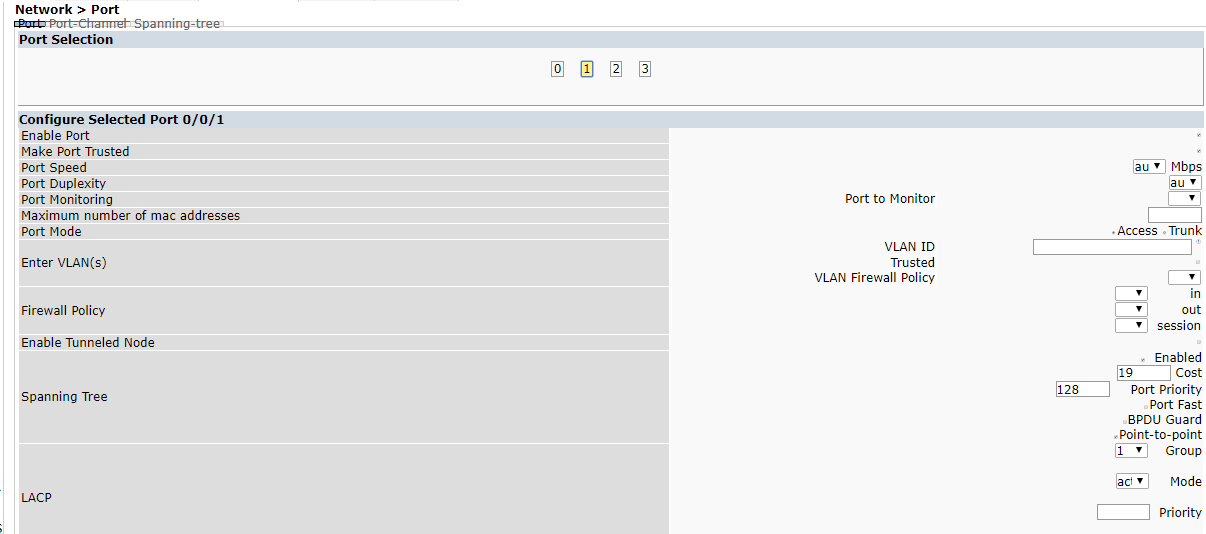
D.Aruba controller GUI的畫面


E.使用Port-channel的方式設定Controller與Switch

一般而言會推薦使用LACP連接controller與switch,加大頻寬的同時也做線路備援
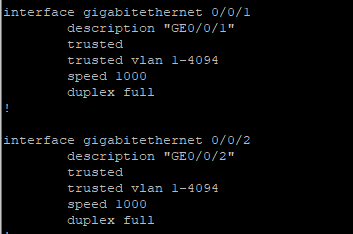
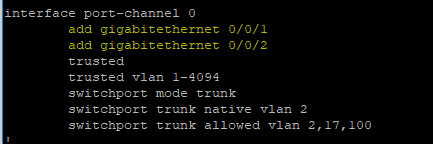
但是在某些時候也許會想要使用Port-channel(靜態)的方式(不跑LACP)

Aruba controller Port-channel的設定方式
(speed/duplex/vlan可修改,只要port-channel中有add介面即可)

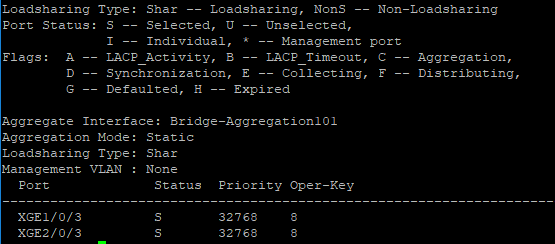
HPE switch Port-channel的設定方式(stp設定非)

Controller檢視port-channel狀態

switch檢視 port-channel狀態